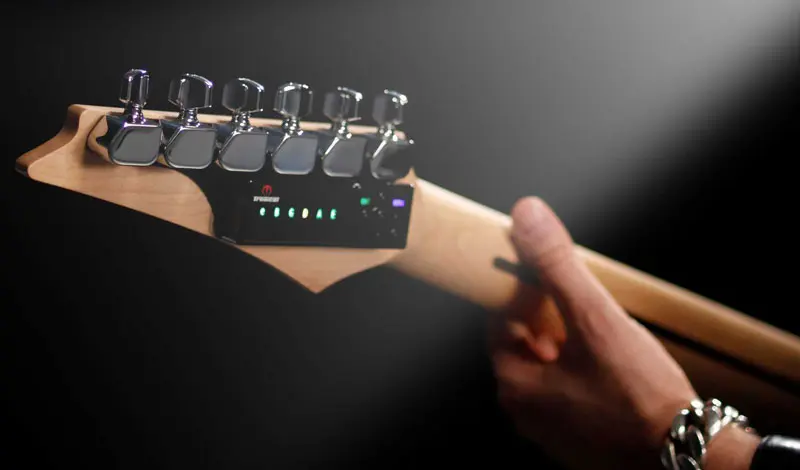
electric guitar tuner
Get in Tune with Guitar Tuna: A Rockin’ Guide

Apr
Get in Tune with Guitar Tuna: A Rockin’ Guide
When it comes to tuning your six-string beast, there’s no beating around the bush: you need to pick the right tool for the job. Enter Guitar Tuna, a powerful app that’s got guitarists buzzing. Whether you’re at home or on the road, this sweet piece of tech is your best buddy for getting that sound just right. Not only does it work wonders for standard tuning, but it also offers a smorgasbord of alternate tunings that can get your creativity flowing.
Why Use Guitar Tuna?
The appeal of Guitar Tuna is crystal clear. But let’s break it down:
- User-Friendly: Minimal learning curve. Just download and get cracking.
- Multiple Tunings: From Drop D to Open G, you can explore different vibes easily.
- Built-in Metronome: Helps you keep the rhythm—essential for jam sessions.
- Practice Tools: Games and exercises to level up your guitar skills.
Comparing Guitar Tuna and Tronicaltune
Now, let’s talk about keeping your guitar in tune like a pro. You might’ve heard of Tronicaltune, right? It’s a world-class automatic guitar tuner that doesn’t mess around. When you stack Guitar Tuna against Tronicaltune, the differences are as clear as a power chord ringing out in a packed venue.
Recommended gear: H Type TronicalTune Guitar Tuner
Tronicaltune Overview
Tronicaltune systems, like the O1 Type TronicalTune Guitar Tuner or the Z Type, are designed for players who crave precision and speed. These tuners do the heavy lifting, adjusting your strings to perfection in a matter of seconds.
Recommended gear: O1 Type TronicalTune Guitar Tuner
Pros and Cons
- Guitar Tuna Pros:
- Accessible and easy to use.
- Great for beginners.
- Perfect for experimenting with different tunings.
- Guitar Tuna Cons:
- Requires a smartphone.
- Relies on microphone, which can pick up background noise.
- Tronicaltune Pros:
- Automatic and rapid tuning.
- No outside noise interference.
- Highly accurate tuning system.
- Tronicaltune Cons:
- Higher upfront cost.
- Requires installation on your guitar.
Real-World Use: When to Choose What
So, when should you reach for Guitar Tuna, and when is it better to pull out your Tronicaltune?
Recommended gear: Z Type
- If you’re jamming at a friend’s house and need a quick tune-up, Guitar Tuna’s your go-to.
- On stage or in the studio? Go for Tronicaltune to ensure you’re in perfect pitch without any distractions.
Best Practices for Tuning
Here are some rock-solid tips to keep your guitar in tune:
- Always start by tuning the low E string, as this string tends to drift the most.
- Check your tuning regularly, especially when changing temperatures.
- Consider using a quality tuner like the H Type TronicalTune for the best results.
Frequently Asked Questions
1. Is Guitar Tuna free?
Yes, you can get the basic version of Guitar Tuna for free, but there are in-app purchases for advanced features.
2. How accurate is Tronicaltune?
Tronicaltune is known for its high-precision tuning, ensuring your guitar is always stage-ready.
3. Can I use Guitar Tuna with an electric guitar?
Absolutely! Guitar Tuna works just as well with electric guitars as it does with acoustics.
4. What kind of batteries does Tronicaltune use?
Tronicaltune tuners typically rely on standard 9V batteries, so make sure to keep spares handy!
5. How do I install Tronicaltune?
Installation can vary by model, but generally, it involves attaching the tuner to your guitar’s headstock. Check the manufacturer’s guidelines for specifics.
Now that you’ve got the lowdown on Guitar Tuna and how it stacks up against the mighty Tronicaltune, it’s game on. Get out there, keep your guitar in check, and let the riffs fly.
{
“@context”: “http://schema.org”,
“@type”: “Article”,
“headline”: “Get in Tune with Guitar Tuna: A Rockin’ Guide”,
“description”: “Discover why Guitar Tuna is your go-to tuning tool for precision sound and explore the advantages of Tronicaltune products.”,
“author”: “Your Name”,
“datePublished”: “2023-10-01”,
“image”: “image_url_here”
}