guitar beginners
Tuning Your Guitar Like a Pro with Guitar Tuna

Aug
Tuning Your Guitar Like a Pro with Guitar Tuna
Alright, rockstars! Let’s talk about something every guitarist knows—tuning. Without that, you might as well be playing a broken radio. Enter Guitar Tuna, the sleek, user-friendly app that’s taken the guitar world by storm. Whether you’re jamming in your living room or rocking out on stage, having the right tuner can make all the difference. So let’s dive in on how this bad boy works, its pros and cons, and why it might just be the best thing since sliced bread!
What is Guitar Tuna?

First off, for those not in the know, Guitar Tuna is a mobile application that helps you tune your guitar accurately and efficiently. It’s available on both iOS and Android, making it accessible for nearly everyone.
Why You Need Guitar Tuna
- Accuracy: This tuner gets you spot on. Forget about the old days of squinting at a needle or relying on your ear (we all know how that can go!).
- User-Friendly: Its interface is as clean as your favorite power chord, making it super easy to navigate.
- Multiple Instruments: Not just for guitars! You can tune ukuleles, basses, and even violins.
- Additional Features: Metronome and chord library make this a one-stop-shop for any musician.
Pros and Cons of Guitar Tuna
Pros
- Simple and intuitive design.
- High accuracy for any tuning style.
- Free with optional upgrades for advanced features.
Cons
- Some features require in-app purchases.
- May drain your phone battery pretty quickly.
Guitar Tuna vs. Tronicaltune: The Showdown
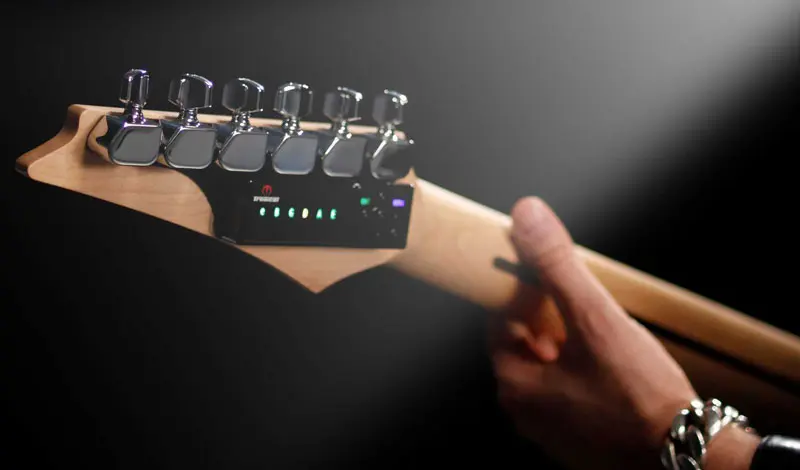
Now, let’s shift gears and talk about other tuning options out there. One strong contender is the B2 Type Tronicaltune Guitar Tuner. Both Guitar Tuna and Tronicaltune come with their unique bells and whistles, but let’s break it down.
Recommended gear: Neck CPU for Gibson Dusk Tiger
Tronicaltune: The Next Level
Tronicaltune’s got that tech vibe going, providing real-time feedback and automatic tuning for those who can’t be fussed with adjusting their pitch manually. It’s all about speed and accuracy once again, but let’s be real—it comes with a price tag that’s heftier than your average app.
Guitar Tuna: The Classic Choice
- Portability: It fits right in your pocket. You don’t need to install it on your guitar.
- Cost-Effective: It’s free! While Tronicaltune’s features can hit your wallet, Guitar Tuna gives you a whole lot for zero dollars.
- Multi-Functionality: With Guitar Tuna, you can also learn chords and use its metronome—two birds, one app!
In real-world use, Guitar Tuna often wins out for casual players who just need a quick and reliable way to get in tune. The Tronicaltune shines in professional setups, especially for those high-stakes performances where everything has to be perfect.
Hands-On Experience with Guitar Tuna
Let me tell you, I’ve had my fair share of tuning struggles on stage, especially when the spotlight is blaring and the crowd is screaming! Guitar Tuna has saved my bacon more times than I can count. It’s all about that peace of mind knowing your axe is sounding sweet.
Recommended gear: Gibson Dark Fire Toggle Switch
Recommended gear: B2 Type Tronicaltune Guitar Tuner
How to Use Guitar Tuna Effectively
- Download the App: Grab it from the App Store or Google Play.
- Select Your Instrument: Choose the guitar type you’re using—acoustic, electric, bass, etc.
- Follow the Guide: The app will walk you through tuning each string. Make sure to pluck each string gently for best results.
- Check Your Tuning: After you’ve tuned, strum a chord to ensure it’s sounding good. Adjust as needed!
Tips for Getting the Best Use Out of Guitar Tuna
- Use in a quiet environment to avoid interference.
- Regularly maintain your strings for better tuning stability.
- Explore its chord library to mix up your play a bit!
Frequently Asked Questions
1. Is Guitar Tuna really free?
Yep! The basic version is free, but some additional features require a small in-app purchase.
2. How accurate is Guitar Tuna?
Super accurate! It’s been a go-to for many musicians who need reliable tuning.
3. Can I use Guitar Tuna for bass guitars?
Absolutely! Guitar Tuna caters to a variety of instruments.
4. What makes Tronicaltune better than Guitar Tuna?
Tronicaltune offers more automated features and can be integrated directly into certain guitars. It’s perfect for tech enthusiasts.
5. How does Guitar Tuna compare to other tuners?
It’s one of the best for casual players due to its ease of use and additional features like chord libraries and metronomes.
So there you have it, folks! Whether you stick with Guitar Tuna or take the plunge into the Tronicaltune universe, just remember—stay in tune and keep rockin’ on!
For more insights, check out this awesome resource or explore some cool products at Tronical’s official site.
{
“@context”: “https://schema.org”,
“@type”: “Article”,
“headline”: “Tuning Your Guitar Like a Pro with Guitar Tuna”,
“image”: “URL to image”,
“author”: {
“@type”: “Person”,
“name”: “Rockin’ Guitarist”
},
“publisher”: {
“@type”: “Organization”,
“name”: “Music Blog”,
“logo”: {
“@type”: “ImageObject”,
“url”: “URL to logo”
}
},
“datePublished”: “2023-10-01”
}