stage guitar tuner, AI Guitar Tuner
Switching Guitars Live Without Holding Up the Next Song

Sep
The last chord ends. Your next guitar is on its stand, already tuned. You pick it up, move the cable, and look down at the pedalboard. Which input is selected? Is the volume still down? Has the drummer started counting?
Switching guitars live is a small piece of stagecraft that deserves rehearsal. The tuning check matters, but it is only one part of getting an instrument ready for the next song. A guitar tuner cannot choose the right input or tell the band you need another moment.
Here is a practical way to rehearse that handoff. The equipment examples below come from manufacturer documentation, not a hands-on comparison or a claim that one rig is faster than another.
Write the change into the set list
Start with the transition that asks the most of you. That might be electric to acoustic, a guitar in a different tuning, or an instrument that uses another wireless transmitter.
Under the next song's name, write the guitar, its tuning, and any input or preset change. Use names you can recognize at a glance: "black guitar" is more useful under pressure than two nearly identical model numbers.
For example, a rehearsal note might read:
"Song 4: acoustic – standard tuning – acoustic input – wait for my nod."
That is an invented example, not a prescription for every band. Add a capo position or pickup setting if the song needs one. Leave out information that never changes.
Also decide who fills the gap. A spoken introduction can give you room to work, but only if the person speaking knows not to finish before you are ready. Do not make the whole arrangement depend on a perfectly timed scramble.
Separate the guitar check from the connection check
Before the set, check each instrument in the configuration you will actually use. Confirm its intended tuning with the guitar tuner, then listen to the opening chord or riff. Set its controls deliberately rather than assuming they stayed where you left them.
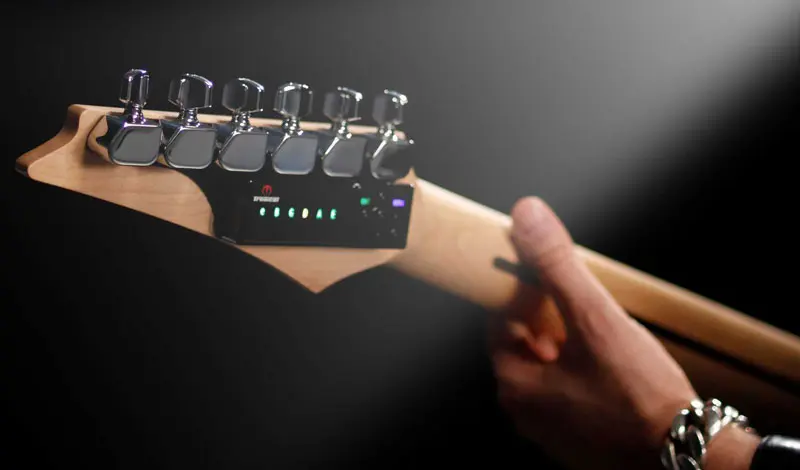
For a TronicalTune-equipped guitar, confirm the selected tuning as well as completion of the tuning process. The TronicalTune online manual explains bank and preset selection and notes that the last completed tuning becomes the default at the next switch-on. Turning the unit on is therefore not the same as deliberately selecting standard tuning.
Then test the connection separately. Can you identify the input carrying this guitar? Can the sound engineer hear it? Can you hear it through the monitor path you will use?
During the show, keep those same two questions distinct: "Is this instrument ready?" and "Is the rig listening to it?" If something goes wrong, that distinction gives you a sensible starting point instead of a reason to press every switch.
Know what your wireless change actually does
Two guitars with transmitters do not automatically behave like two inputs on a mixer.
Shure's GLXD6+ guide allows two transmitters to be linked to one receiver, but says only one should operate at a time. It also allows separate gain settings to be stored for each transmitter. That makes the transmitter power sequence part of the change, not an afterthought. See the GLXD6+ user guide, pages 13 and 15.
The same receiver's A/B mode is a different arrangement: its footswitch selects between the wireless transmitter and the wired instrument input, with audio live in both states. It is not a two-wireless-transmitter selector or a mute command. Shure documents that distinction on page 17 of the same guide.
These are model-specific examples. Read your own receiver's instructions before borrowing either workflow. At rehearsal, practice the exact sequence your equipment requires, including the point where you confirm that the new instrument has a signal.
Match the level where the audience hears it
A comfortable level beside your amp does not settle what happens at the PA. If you change between electric and acoustic guitars, ask the engineer to hear both during soundcheck, including the strongest strum or picking attack you expect to use.
There is a useful example in the LR Baggs Venue DI user's guide: the volume control affects the quarter-inch output but not the XLR output. On that device, adjusting your local level does not make the same adjustment to the feed going to the mixing console.
The lesson is not that every DI behaves that way. It is that you need to know which control affects which destination.
Agree on the intended relationship between the guitars. An acoustic introduction need not be identical in loudness to a distorted chorus. The goal is a planned change, not an accidental jump that somebody has to catch after the song starts.
Rehearse the gap, not just the songs
Play the ending of one song and the opening of the next. Do not stop the exercise while you change guitars; the gap is the part you are practicing.
Use this order as a starting point, adapting it to your rig:
- Finish the song and engage your tested mute arrangement before unplugging.
- Put the first guitar securely on its stand and take the next one.
- Connect or select the required input using the rehearsed sequence.
- Confirm tuning and the required guitar controls.
- Restore the signal, give the agreed ready cue, and begin.
Time a few attempts if that helps you plan the set, but do not turn the exercise into a speed contest. A cable caught under a stand or a strap that needs untwisting is information. Move the obstruction or simplify the change before trying again.
Keep instructions available offline where possible. The TronicalTune downloads page groups manuals and legacy documents; choose the one that matches your system rather than assuming every generation uses the same procedure.
Give the band a fallback
Agree on what happens if the next guitar is not ready. Repeat an instrumental introduction, take a longer spoken break, or move to an agreed backup song. Choose something your band can actually do.
Then practice that version once. Deliberately withhold the ready cue and let everyone follow the fallback. You have now rehearsed more than a fast guitar swap: you have given the next song a dependable start, even when the change takes longer than planned.