Guitar tuning
Get in Tune with Guitar Tuna: The Ultimate Guide to Tuning Your Axe

Mar
Get in Tune with Guitar Tuna: The Ultimate Guide to Tuning Your Axe
Alright, rockstars, let’s dive into the world of tuning guitars, where precision meets passion. If you want your axe to sound like a million bucks on stage, you gotta start with the right gear. Enter Guitar Tuna—the app that’s become an absolute must-have for every musician. It’s like having a personal roadie in your pocket, tuning your guitar to perfection, anytime, anywhere.
What is Guitar Tuna?
So, what’s the deal with Guitar Tuna? This killer app is designed specifically for guitarists, bassists, and even ukulele players. It’s user-friendly, quick, and super accurate. You can download it on iOS and Android, making it accessible for everyone from beginners to seasoned pros.
Recommended gear: Lock Nut Set for TronicalTune
Why You Should Use Guitar Tuna
- Accuracy: Guitar Tuna’s built-in microphone gives you dead-on readings. It makes sure that every string rings out just right.
- Speed: Whether you’re on the go or in a jam session, you can get tuned up in seconds—no more fiddling around!
- Variety: It supports standard tuning and lots of alternate tunings, making it versatile for different styles and genres.
- User-Friendly: The interface is clean and straightforward, perfect for those who aren’t tech-savvy.
- Learning Tool: It’s got features like metronomes and chord libraries to help you sharpen your skills.
Real-World Use
Picture this: you’re backstage, adrenaline pumping, and you realize your guitar is out of tune. No worries. Just whip out your phone, fire up Guitar Tuna, and you’re good to go in a flash. It’s been a lifesaver for many, cutting down stress before hitting the stage.
Comparing Guitar Tuna with TronicalTune
Alright, let’s get into some friendly competition. We’re talking about TronicalTune, a high-tech tuner built into your guitar. It’s got its perks, but how does it stack up against our trusty Guitar Tuna? Let’s break it down:
Recommended gear: Battery Pack for Min-ETune/ GForce
TronicalTune Overview
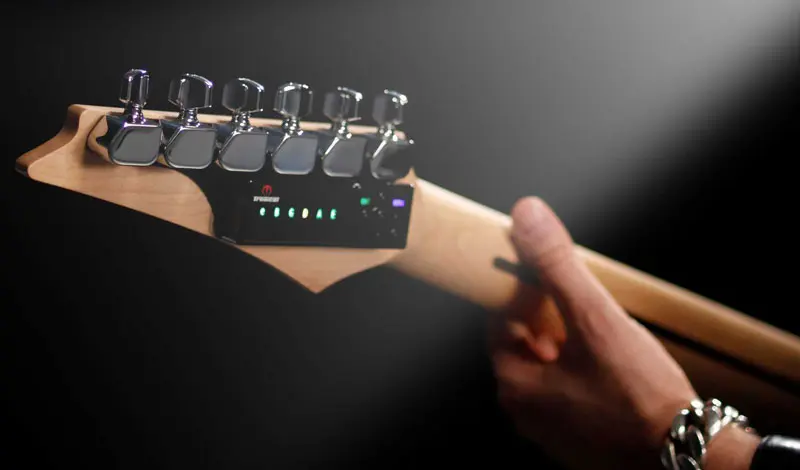
TronicalTune is an innovative automatic tuning system. It’s a game-changer for those who want the convenience of automatic tuning without lifting a finger.
Pros of TronicalTune
- Automatic Tuning: Just strum, and it does all the work. Perfect for quick adjustments during live performances.
- Built-In Design: It’s integrated into your guitar, meaning no extra gear to carry around.
- Multiple Tunings: Easily switch between tunings; it’s like having a whole guitar tech with you.
Cons of TronicalTune
- Price: It can be expensive compared to just downloading an app.
- Dependency: Relying on tech can be a double-edged sword. You might find yourself less in tune with the old-fashioned way.
- Battery Issues: You gotta keep an eye on that battery pack for Min-ETune/GForce. If it dies, you’re out of luck.
Why Guitar Tuna Always Wins
You might be asking, Why pick Guitar Tuna over TronicalTune? Here’s the scoop:
- Accessibility: It’s free or cheap! Why spend a fortune when you can get top-notch tuning for just a download?
- Flexibility: You can use it with any guitar, anywhere, without the need for special hardware.
- Learning Experience: It helps build your ear for tuning over time, while TronicalTune might make you rely too much on tech.
- No Batteries Required: Just your phone. No worrying about dead batteries before a gig!
Guitar Tuna: Tips and Tricks
Now that you’re ready to dive into the world of tuning, here are some tips to maximize your Guitar Tuna experience:
- Use Headphones: This helps cut out background noise, ensuring you get the most accurate reading.
- Tune After Changing Strings: New strings stretch and often need re-tuning multiple times. Use Guitar Tuna to get them settled.
- Stay Calm: Tuning can be stressful, especially before a show. Keep it chill and focus on getting it right.
Maintenance Tips for Your Guitar
While you’re at it, remember to take care of your axe. Here’s how:
Recommended gear: Gibson Dusk Tiger Tailpiece
- Regular Cleanings: Wipe down strings after playing to keep ‘em fresh.
- Check Intonation: Make sure your guitar plays in tune across the fretboard.
- Stay Humidified: Keep your guitar in a good environment to prevent wood warping.
Final Thoughts
Whether you go for Guitar Tuna or step into the future with TronicalTune, the important thing is to keep your guitar sounding its best. Each has its unique flair, but for the musician on the go, Guitar Tuna shines bright. You’ve got the tools to rock out and keep your sound tight, so grab your gear and let’s make some noise!
FAQ
1. What is Guitar Tuna?
Guitar Tuna is a popular tuning app for guitarists, bassists, and other string instrument players, known for its accuracy and user-friendly interface.
2. How does TronicalTune work?
TronicalTune is an automatic tuning system that adjusts your guitar’s tuning with the press of a button, using built-in technology.
3. Is Guitar Tuna free?
Yes, Guitar Tuna is free to download with optional in-app purchases to enhance your experience.
4. Can I use Guitar Tuna with any guitar?
Absolutely! Guitar Tuna works with any guitar, making it an incredibly versatile tool.
5. Why is tuning important?
Tuning is crucial for ensuring your guitar sounds great, enhancing your playing experience, and making you sound better when playing with others.
{“@context”:”https://schema.org”,”@type”:”Article”,”headline”:”Get in Tune with Guitar Tuna: The Ultimate Guide to Tuning Your Axe”,”image”:”https://yourimageurl.com”,”author”:{“@type”:”Person”,”name”:”Your Name”},”publisher”:{“@type”:”Organization”,”name”:”Your Blog Name”,”logo”:{“@type”:”ImageObject”,”url”:”https://yourlogo.com”}},”datePublished”:”2023-10-01″,”articleBody”:”…”}